

What Is Bluetooth MIDI?
The Complete Guide to Wireless MIDI
Imagine connecting your MIDI keyboard to your synth without a cable. Or controlling your pedalboard from across the stage. Or connecting hardware directly to your iPad without occupying its USB port.
That's exactly what Bluetooth MIDI makes possible.
But how does it work? Is Bluetooth MIDI the same as regular Bluetooth? What about latency? And how does it compare with Network MIDI and Ableton Link?
Let's start with the basics.
Bluetooth MIDI Is Still MIDI
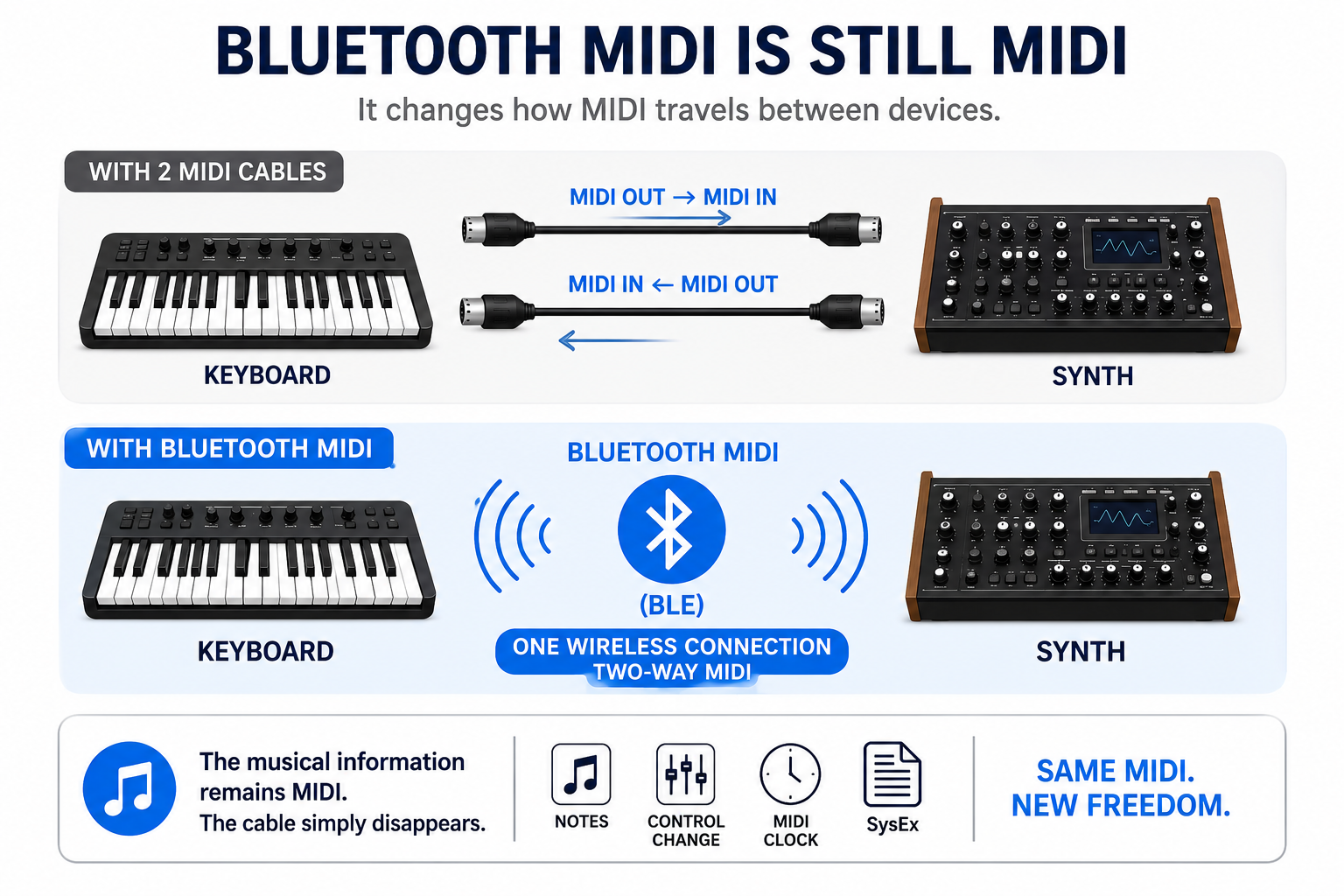
The first thing to understand is surprisingly simple: Bluetooth MIDI doesn't change MIDI. It changes how MIDI travels between devices.
Your notes are still notes. Your Control Change messages are still Control Change messages. Your MIDI Clock is still MIDI Clock.
Instead of sending those messages through a physical MIDI or USB cable, Bluetooth MIDI sends them wirelessly using Bluetooth Low Energy (BLE).
Think of it as replacing:
Keyboard → MIDI Cable → Synth
with:
Keyboard (((( ⇄ )))) Bluetooth MIDI (((( ⇄ )))) Synth
The musical information remains MIDI. The cable simply disappears.
One Wireless Connection, Two-Way MIDI
There's an interesting and useful difference between a traditional MIDI cable and Bluetooth MIDI:
Bluetooth MIDI is bidirectional by default.
A traditional 5-pin DIN or TRS MIDI cable carries MIDI in one direction. If two devices need to send MIDI to each other, you normally need two cables:
MIDI OUT → MIDI IN
MIDI IN ← MIDI OUT
With a Bluetooth MIDI adapter connected to both MIDI IN and MIDI OUT, the wireless connection can carry MIDI in both directions:
Device A (((( ⇄ )))) Bluetooth MIDI (((( ⇄ )))) Device B
That means a single wireless Bluetooth MIDI connection can replace two traditional MIDI cables.
For example, connect a single WIDI Master to the MIDI IN and OUT of a synthesizer and it can both send and receive MIDI wirelessly.
Bluetooth MIDI Is Not Bluetooth Audio
This is an important distinction. Bluetooth MIDI and Bluetooth audio are two completely different things. Bluetooth audio transmits the actual sound.Bluetooth MIDI transmits small instructions that tell another device what to do.
For example, when you press the middle C on a Bluetooth MIDI keyboard, it doesn't transmit the sound of a piano. Instead, it sends MIDI information that essentially says: "Play note 60 now." The receiving synthesizer, computer or app then generates the actual sound.
Because MIDI messages contain very little data compared with an audio stream, Bluetooth MIDI is particularly well suited to wireless control.
Every Bluetooth MIDI Connection Has Two Roles
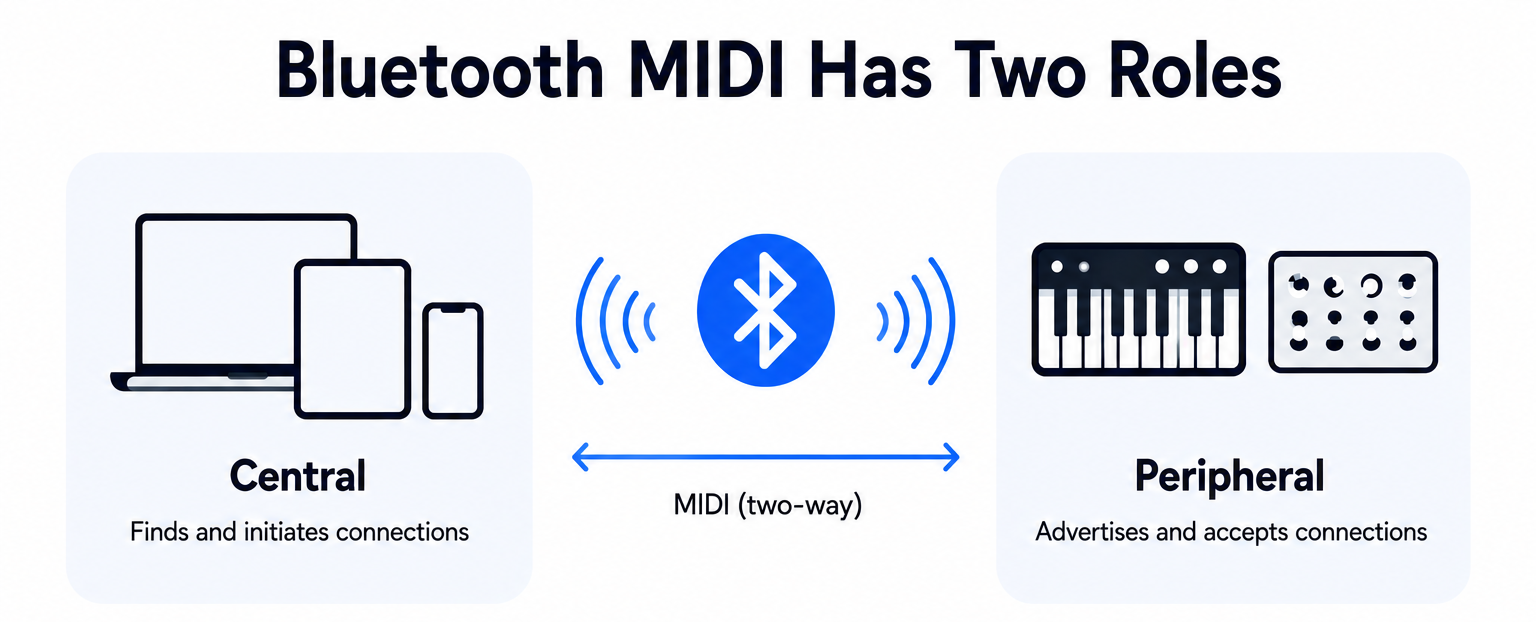
Just like USB has a Host and a Device, Bluetooth connections also have different roles. With Bluetooth Low Energy, these are commonly called:
- Central: The device that discovers and initiates connections.
- Peripheral: The device that advertises itself and accepts a connection.
Think of it like making a phone call. The Central finds the Peripheral and starts the connection. Once connected, MIDI messages can travel between them.
Smartphones, tablets and computers can commonly take the Central role, while Bluetooth MIDI controllers can mostly only operate as Peripherals.
Dedicated Bluetooth MIDI adapters can make these roles even more flexible and switch automatically depending on the type of connection you need.
Is All Wireless MIDI Bluetooth MIDI?
No.
Wireless MIDI describes the result - MIDI without a physical cable - not necessarily the technology being used.
There are several ways to achieve this.
Bluetooth MIDI
Bluetooth MIDI uses Bluetooth Low Energy (BLE).
One major advantage is compatibility. BLE is already built into many smartphones, tablets and computers, allowing compatible products from different manufacturers to communicate using the standardized Bluetooth MIDI specification.
Bluetooth operates in the 2.4 GHz frequency range, which it shares with Wi-Fi and many other wireless technologies.
So how does it deal with such a busy wireless environment? One important part of Bluetooth technology is Adaptive Frequency Hopping (AFH).
Rather than relying on one fixed frequency, Bluetooth hops between available channels and can adapt its channel usage when interference is detected.
Think of it like driving through a busy city. If one street becomes congested, Bluetooth can use another route. AFH doesn't make Bluetooth immune to interference, but it helps create a more robust connection in crowded RF environments, especially compared to other wireless technologies.
Network MIDI
MIDI can also be transmitted over an IP network. This is commonly referred to as Network MIDI.
That network can be wireless:
MIDI → Wi-Fi → Network → Device
Or wired:
MIDI → Ethernet → Network → Device
Wi-Fi is simply one way of connecting to the network. Network MIDI can be particularly useful in computer-based studios, installations and larger networked environments.
The important difference is that it relies on an IP network, while Bluetooth MIDI can establish a direct wireless connection without requiring a Wi-Fi router or network infrastructure.
Proprietary 2.4 GHz Wireless MIDI
Some wireless MIDI products use their own proprietary radio technology. These systems are often described simply as "2.4 GHz wireless."
But there's an important detail:
Bluetooth also operates in the 2.4 GHz frequency band. So Bluetooth and 2.4 GHz aren't opposites.
2.4 GHz describes the frequency range. Bluetooth describes the communication technology operating within it.
A proprietary 2.4 GHz MIDI system may be optimized for a specific application, but it generally requires a matching transmitter and receiver from the same ecosystem.
Bluetooth MIDI, on the other hand, is based on an established standard and can communicate with compatible Bluetooth MIDI products from different manufacturers.
What About Ableton Link?
Ableton Link is wireless when used over Wi-Fi, but it isn't another form of Bluetooth MIDI or Network MIDI. It solves a different problem.
Link allows compatible music applications and devices on the same network to share musical timing, including tempo, beat and phase.
Imagine several musicians performing with different laptops and tablets. Ableton Link helps everyone stay synchronized.
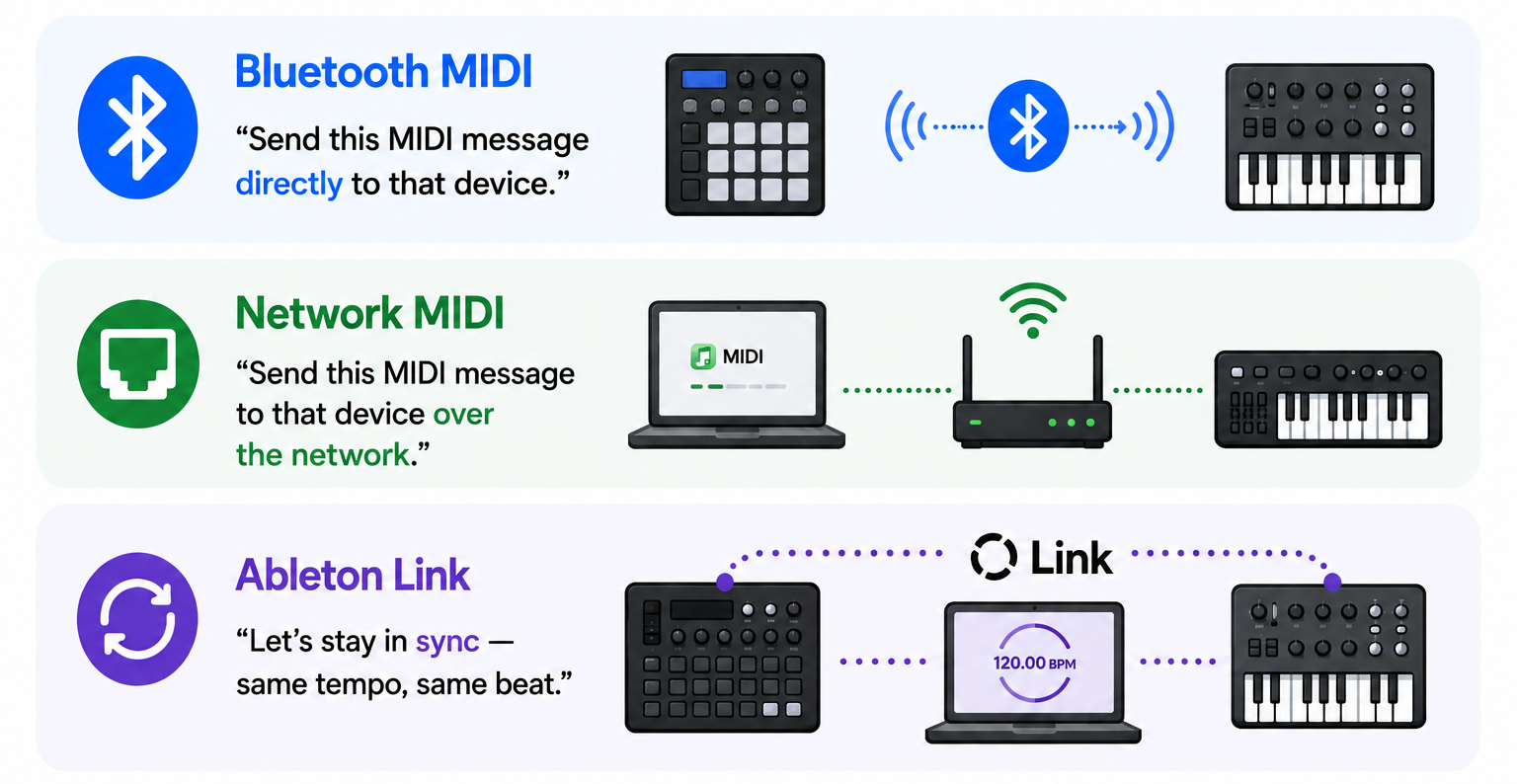
The easiest way to remember the difference is:
- Bluetooth MIDI: "Play this note now."
- Network MIDI: "Send this MIDI message across the network."
- Ableton Link: "This is our tempo and this is where we are on the beat."
All three can be useful in a modern music setup, but they serve different purposes.
Why Bluetooth MIDI?
For many setups, a MIDI cable remains a perfectly good solution. Bluetooth MIDI becomes particularly interesting when the cable itself starts limiting your workflow.
On Stage
Connect equipment across the stage without running long MIDI cables between your keyboard, rack or pedalboard.
On Your Pedalboard
Control MIDI equipment elsewhere on stage while keeping your pedalboard compact and mobile.
In the Studio
Move controllers around your studio without changing your permanent cabling every time.
With Mobile Devices
Connect MIDI hardware to an iPad, iPhone or other compatible mobile device without physically connecting a MIDI cable.
With Older MIDI Hardware
Add modern wireless connectivity to instruments that were designed decades before Bluetooth MIDI existed.
Wireless MIDI isn't simply about having fewer cables. It's about having more freedom to decide where your equipment can be.
What If My Instrument Doesn't Have Bluetooth MIDI?
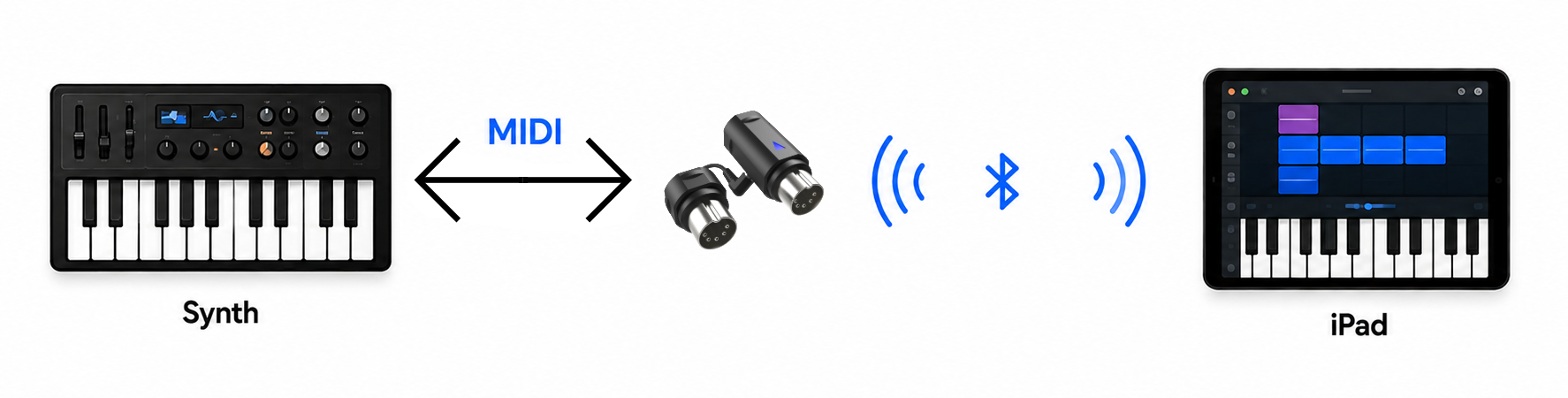
This is where a Bluetooth MIDI adapter comes in. A synthesizer doesn't need to have Bluetooth built in to become part of a Bluetooth MIDI setup. The adapter bridges its existing MIDI connection to Bluetooth MIDI.
For example:
Synth ⇄ MIDI ⇄ Bluetooth MIDI Adapter (((( ⇄ )))) iPad
Or:
USB MIDI Controller ⇄ USB Host Bluetooth MIDI Adapter (((( ⇄ )))) Synth
Your instrument continues sending and receiving MIDI exactly as it always has. The adapter simply gives those MIDI messages a wireless path. This is the basic idea behind the CME WIDI ecosystem.
Which Bluetooth MIDI Adapter Do I Need?
Start by looking at the MIDI connection already available on your equipment.
5-Pin DIN MIDI
Have traditional MIDI IN and OUT connectors? WIDI Master adds Bluetooth MIDI to compatible 5-pin DIN MIDI equipment.
TRS MIDI
Many compact synthesizers, controllers and pedals use 3.5 mm TRS MIDI connectors. WIDI Jack is designed to bring these devices into a Bluetooth MIDI setup.
USB MIDI
This one is slightly different. Most USB MIDI controllers are USB Devices, which means they need a USB Host before they can communicate.
WIDI Uhost combines USB Host functionality with Bluetooth MIDI, allowing compatible class-compliant USB MIDI devices to communicate wirelessly.
Computer or USB Host
If your computer or USB Host needs a dedicated WIDI connection, WIDI Bud Pro provides Bluetooth MIDI connectivity through USB.
The principle is simple: Look at the MIDI connection you already have, then choose the WIDI solution that matches it.
What About Latency?
This is usually one of the first questions musicians ask about wireless MIDI:
"Will I feel a delay?"
Every digital connection requires some time to transmit and process information. The important factors for musicians are therefore not simply whether latency exists, but how low and how consistent it is.
CME developed WIDI specifically for real-time MIDI communication. WIDI combines Bluetooth Low Energy with CME's own connectivity algorithms to optimize latency, jitter and connection stability for musical applications.
That makes Bluetooth MIDI useful for much more than changing a synthesizer patch from across the room. It can become part of the actual performance.
WIDI-to-WIDI: No Computer Required

Connecting Bluetooth MIDI to a computer, iPhone or iPad is useful. But wireless MIDI becomes particularly interesting when both sides of the connection are dedicated MIDI hardware.
For example:
Keyboard ⇄ WIDI Master (((( ⇄ )))) WIDI Jack ⇄ Synth
There is no computer in the middle. No tablet. No Wi-Fi router. The WIDI devices establish the Bluetooth MIDI connection directly. That means wireless MIDI can become part of a completely standalone hardware setup.
Power on your equipment and start making music.
One-to-One Is Only the Beginning
Replacing one MIDI cable with one wireless connection is the easiest place to start. But WIDI can go further.
Compatible WIDI devices can be organized into groups, allowing one WIDI device to communicate with multiple WIDI devices.
That opens up completely different workflows.
One keyboard can control several synthesizers positioned around a studio.A pedalboard can communicate with equipment elsewhere on stage. A controller no longer needs to physically sit next to the equipment it's controlling.
This is where wireless MIDI becomes more than simply a cable replacement. It changes how you can design your MIDI setup.

Do I Need an App?
Not for normal WIDI-to-WIDI operation.Once your WIDI setup has been configured, compatible WIDI devices can establish their connection automatically.
The WIDI App is primarily used for configuration, firmware updates and advanced settings. That means your phone or tablet doesn't have to remain part of your live MIDI setup.
Configure your system, then let the hardware do the work.
Wired or Wireless MIDI?
There's no need to choose one. For many musicians, the smartest solution is hybrid MIDI. Keep permanent connections wired. Use Bluetooth MIDI where mobility and flexibility matter.
You might keep your studio synthesizers connected by cable while making your master keyboard wireless.
Or keep your pedalboard wired internally while using WIDI to communicate with your keyboard setup across the stage.
Wired and wireless MIDI aren't competitors. They're two tools for building the setup that works best for you.
So Which Wireless Technology Should You Use?
It comes down to what you're trying to achieve.
Want to replace a MIDI cable?
Bluetooth MIDI is designed for direct wireless MIDI communication.
Want MIDI to travel across an IP network?
Look at Network MIDI using Wi-Fi or Ethernet.
Using a proprietary wireless MIDI system?
You'll generally need the manufacturer's matching transmitter and receiver.
Want several musicians, apps or devices to share musical timing?
That's where Ableton Link becomes interesting.
There isn't one wireless technology that's best for every situation. Understanding what each one actually does makes choosing much easier.
Wireless MIDI Starts Here
Bluetooth MIDI can sound complicated when terms such as BLE, Central, Peripheral, Adaptive Frequency Hopping and latency enter the conversation.
But the basic idea is remarkably simple: MIDI stays MIDI. The cable disappears. Your instruments still exchange notes, controllers, clock, SysEx and other MIDI messages.
Bluetooth simply gives those messages another way to travel.
Once you understand that, Bluetooth MIDI stops feeling like a completely different technology. It becomes another connection in your MIDI toolbox. One that happens to be wireless.
See Bluetooth MIDI in Action
Want to see how it works in the real world?
Watch the WIDI in 1 minute to understand the basics, connect your first devices and discover how wireless MIDI can fit into your own setup.
